
Built and run daily at a working Michigan trailer dealership
List it once.
It’s live everywhere.
Built for dealers, ready for any store that sells in person and online.
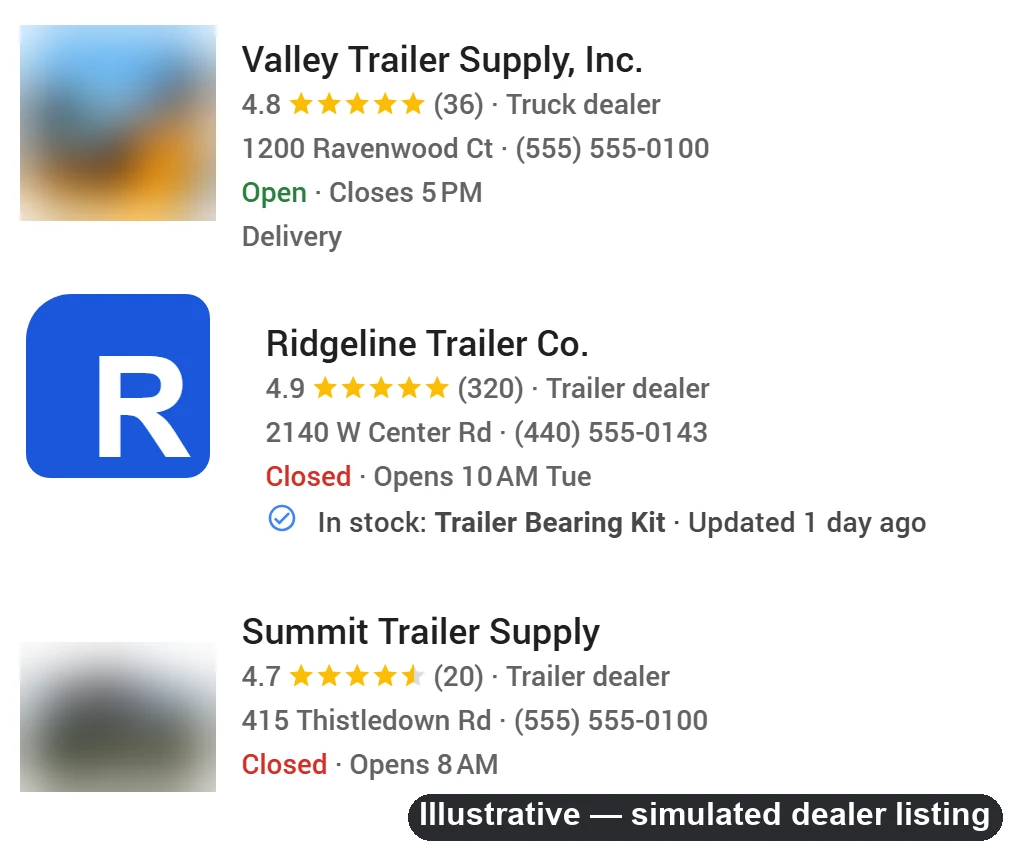
One record at the counter puts a part or a trailer on your website, in Google Shopping, on Meta, Bing, eBay and Facebook Marketplace — the same minute, from the same system.
No plugins · no nightly sync · no second web platform to keep in step
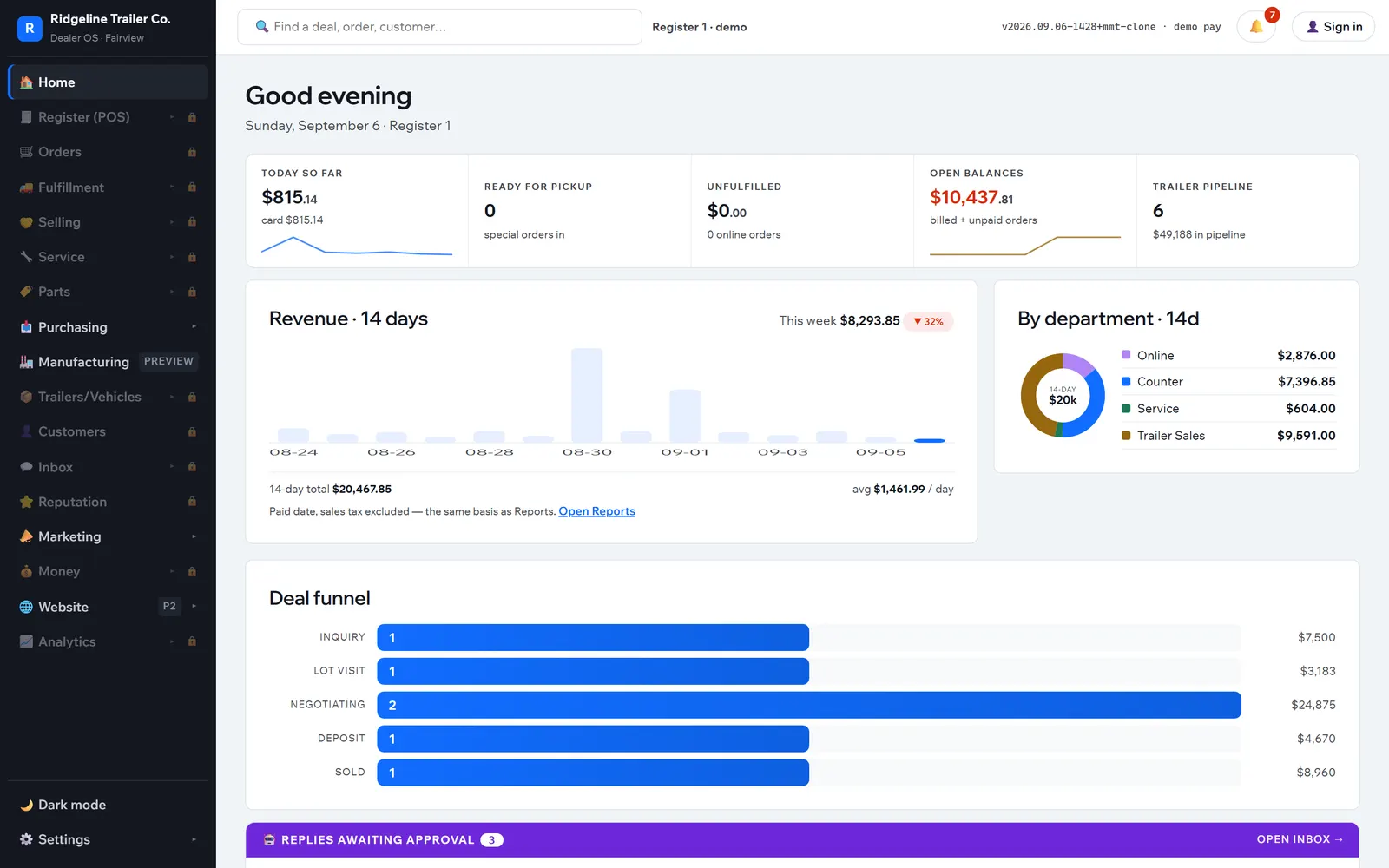
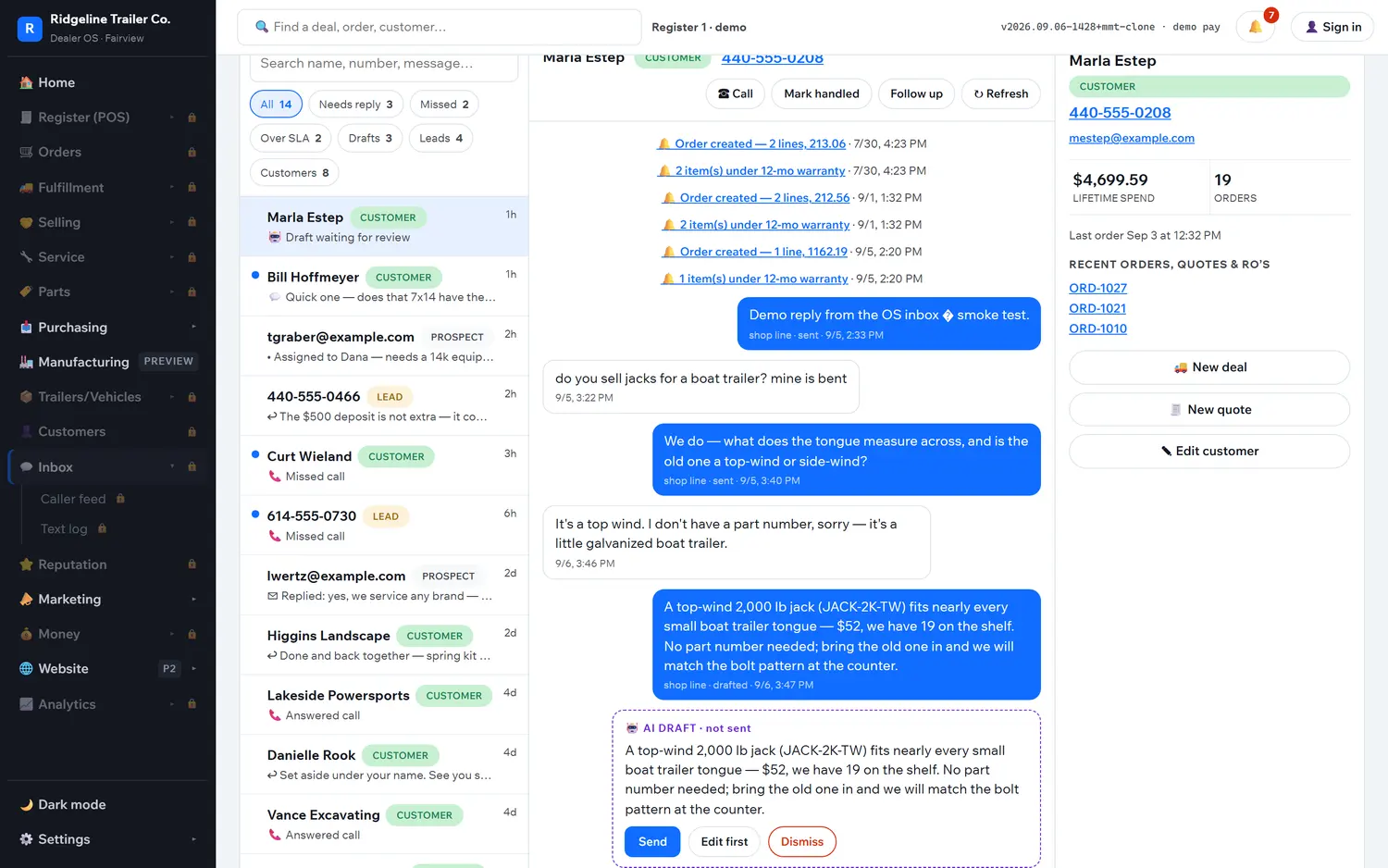
The counter opens on this. Every number recomputes off live tickets — there is no report to run.
- Your storefront
- Google Shopping
- Local Inventory
- Vehicle Listings
- Meta
- Bing
- eBay
- Facebook Marketplace
Register through titling, all on one login.
Your store plus seven feeds and marketplaces.
Everything above reads the same rows.
Nothing to reconcile, because nothing is copied.
The one-system claim
Most dealers run four businesses that share a sign
A shop system for the counter. A website on a different platform. A spreadsheet somebody hand-builds for the shopping feeds. A marketplace account somebody logs into on Fridays. Every one of them holds its own copy of the same product, and the copies drift.
One catalog, not two
The list the register searches is the list the website renders its pages from. Stock moves as tickets, receipts and returns post — and the storefront reads those same rows, not a copy of them.
Publishing is just saving
Set a product Active and it is on the store, in the sitemap and in the shopping feeds. If nothing on the site links to it, the editor says so and offers the fix. There is no export step and no publish queue.
Every channel follows
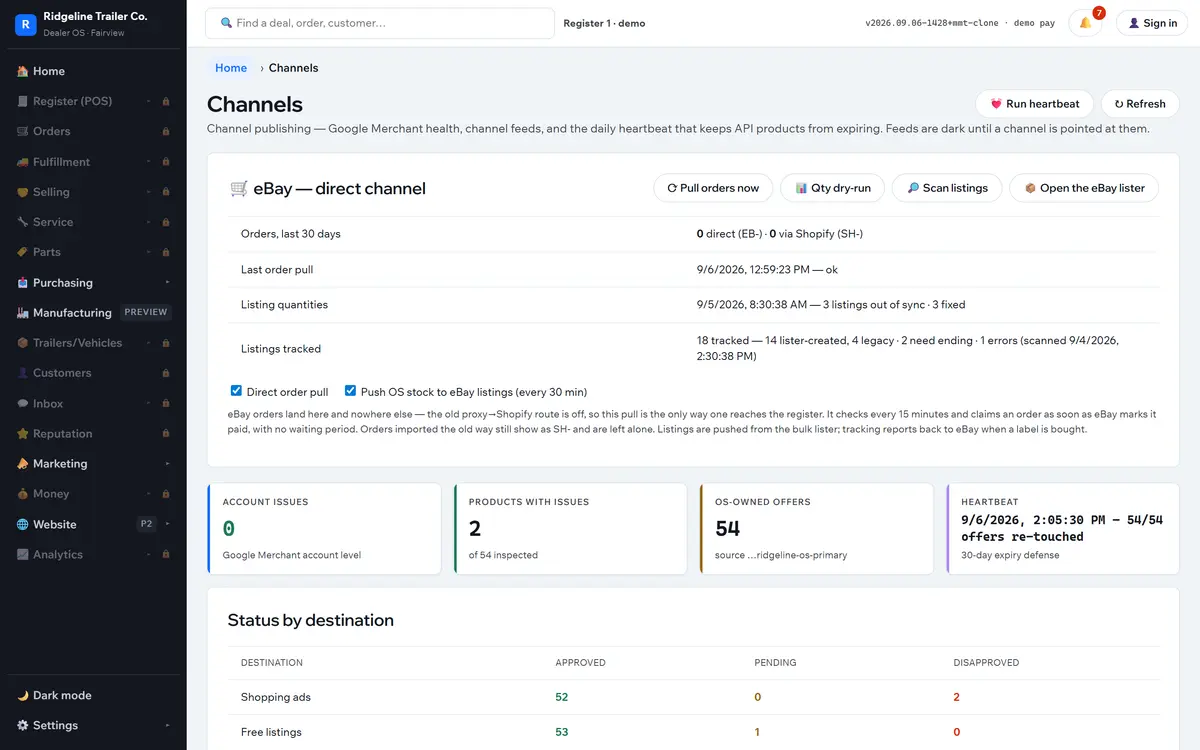
Feeds regenerate from the catalog on a schedule, and a daily heartbeat re-touches offers so they cannot expire. Merchant Center health is read back destination by destination, naming the product and the field holding it up.
Eight places, one save
Saving a product or marking a unit in stock is the whole publishing workflow. Everything below reads from that one record.
- Your own storefrontProducts, in-stock trailers, guides and CMS pages on your own domain.
- Google Shopping, free listings & Local InventoryFeed and store code, regenerated on a schedule.
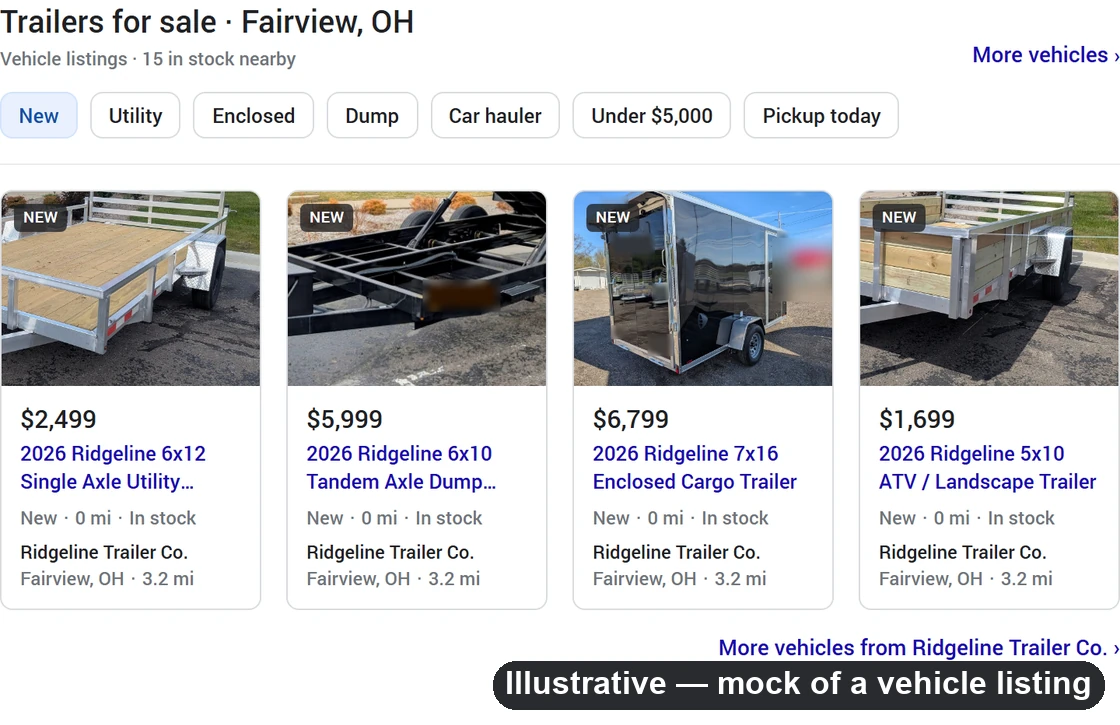
- Google Vehicle ListingsOne row per VIN, retired the day the unit sells.
- Meta, Bing, eBay and Facebook MarketplaceCatalog feeds plus a fee-guarded eBay API channel and unit-driven Marketplace posts.
Selling trailers and vehicles online
A trailer is not bought in one click. So don’t ask for one.
Every dealer platform can sell a bearing kit. Almost none can sell the thing on the lot. Skucast sells units the way units actually sell: a fixed deposit holds it, the balance is due at delivery, and the paperwork comes out of the same record.
- The quote carries a pay link — alwaysA quote a customer cannot act on goes cold. Parts quotes link to the full amount. A quote containing a unit links to the deposit instead, with the terms stated above the form.
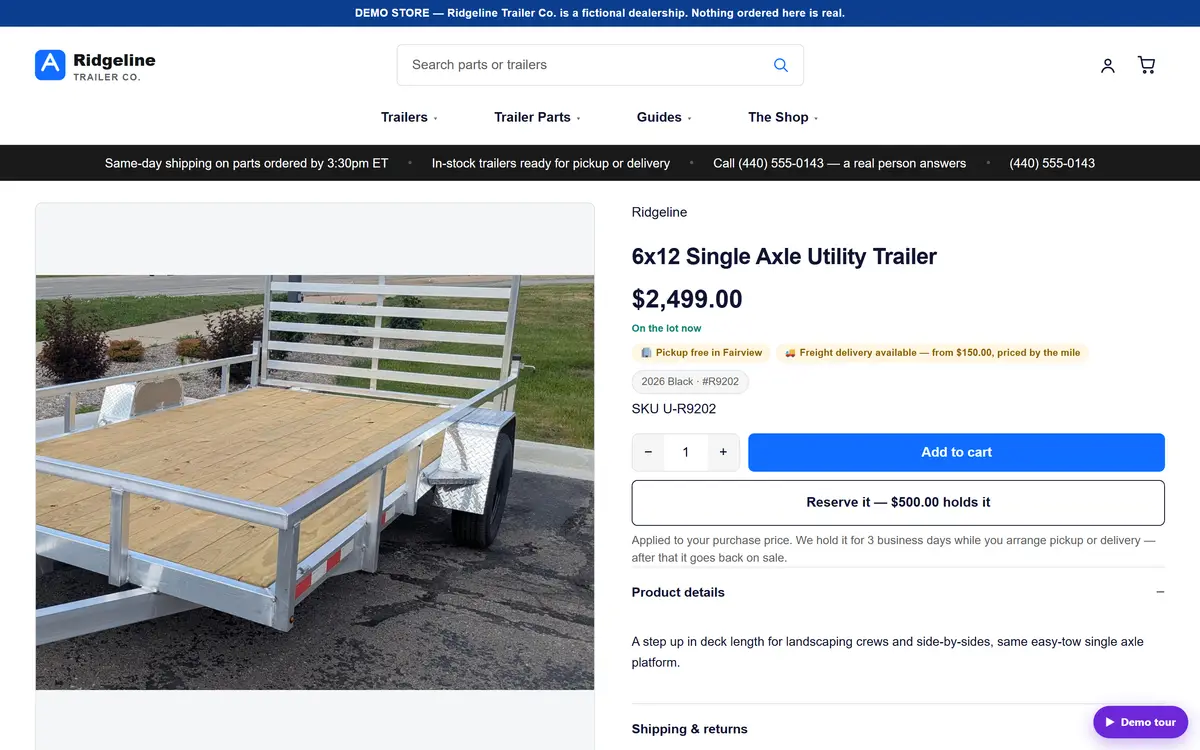
- Or the shopper reserves it from the websiteThe trailer’s own page on your store takes the same deposit, on the same payment screen, with the same trust marks as your checkout.
- The deposit clears and the system binds a VINIt takes the oldest free unit of that model, holds it for three business days, and writes the balance order with the deposit already applied. If none is free, the line becomes a tracked waiting-build instead of a promise you cannot keep.
- Freight is quoted, never guessedUnits ship by freight quote, not by a parcel table. Oversize rigid goods are pickup-only store-wide, and the storefront simply never offers shipping on them.
- The paperwork prints from the recordState title application, MCO, police book and stock number all come off intake. The paperwork is a by-product, not a second job.
- Sold means gone, everywhereThe unit retires itself out of the vehicle feed, the storefront and the marketplace listings. There is never a live listing for a trailer that left the lot.
Rules the system enforces for you
- Deposit, not full priceA unit quote never links to the whole balance. The deposit amount is a setting, not a number typed into a template.
- Refund releases the holdRefunding a deposit puts the unit back on the lot and back in the feeds, automatically.
- Cancelling is one operationLabels void first, stock returns, money reverses, the record closes — through a single owner, so a cancel can never finish halfway.
A web order is not a second ledger
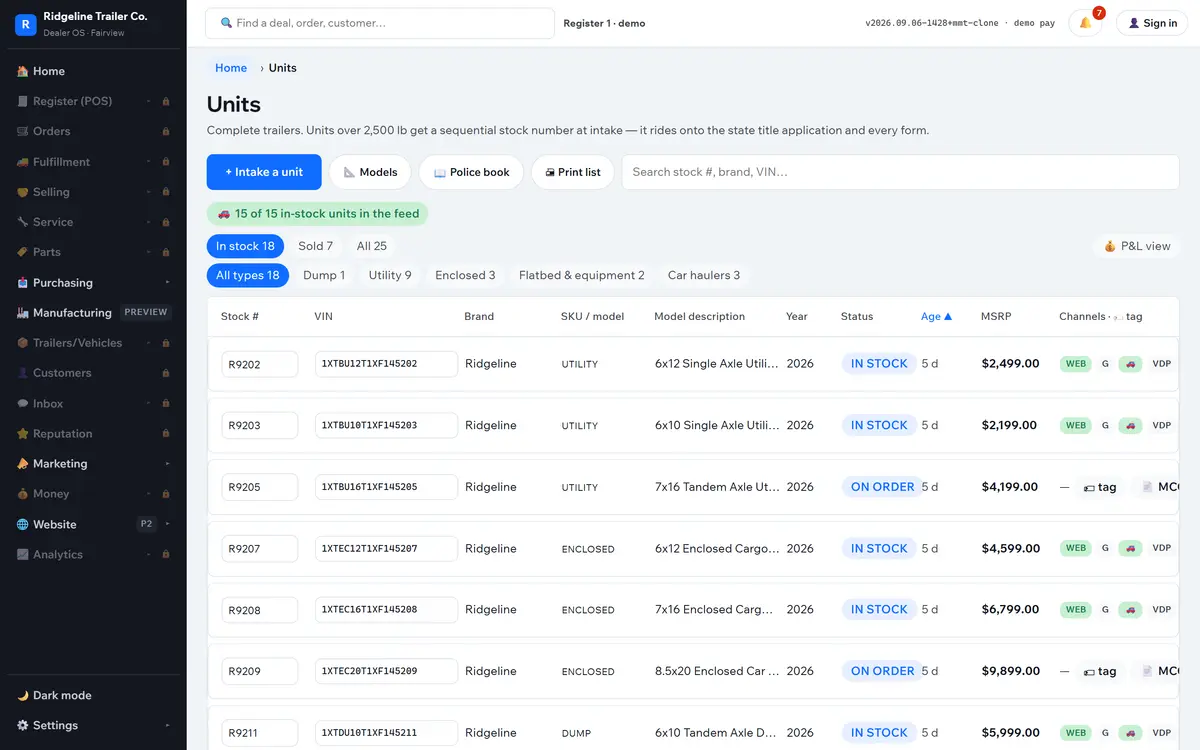
- Serialized, not countedA trailer is one physical thing with a VIN, stock number, model code, landed cost, lot age and title status — never a quantity in a bin.
- Stock reserved at checkoutThe checkout writes the order, reserves the stock and files the payment record. Nobody re-keys a web sale into the counter system.
- Feed readiness is visibleFor any in-stock unit that is short, the screen names what is missing: photo, price, VIN, year or colour.
See it running
These are screens from a real dealership, not a mock-up
Everything below is the furnished demo dealer — a fictional Ohio trailer store with a full catalog, a lot, orders, service tickets, message threads, feeds and reports. You get your own login to it.
The modules
One login. The whole dealership.
Twenty-five screens, all reading the same records. Filter by the part of the business you care about — each card also carries what it does without anybody driving it.
Showing all 25 modules.
Home
Today’s money, what is ready for pickup, what is unfulfilled, what is owed — one strip of live numbers over a single needs-attention feed.
Inbox
Texts, calls on the shop line and website leads in one thread list, one customer per row. Chips across the top are the triage: needs reply, missed, over SLA, drafts.
Inbox · AI replies
The assistant drafts from this store’s own knowledge — hours, deposit and returns policy, delivery terms, the live catalog and the customer’s own orders. It sits in a box marked not sent.
Register
Scan or search, tap the part, attach a customer, take the tender — card, cash, check or on account. Cash drawer with pay-ins, pay-outs, blind close and a Z-report.
Orders
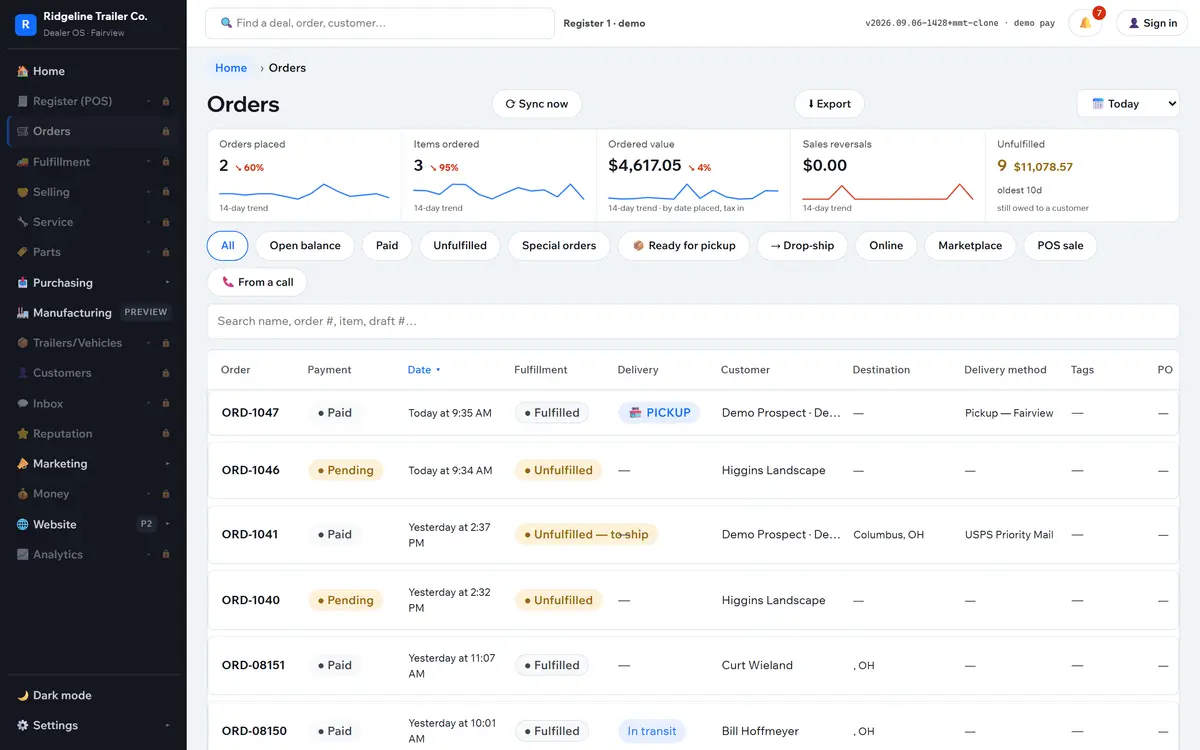
Web, counter, phone and marketplace in one ledger. Same numbering, same refunds, same tracking, plus a cancel that voids labels before it touches money.
Fulfillment
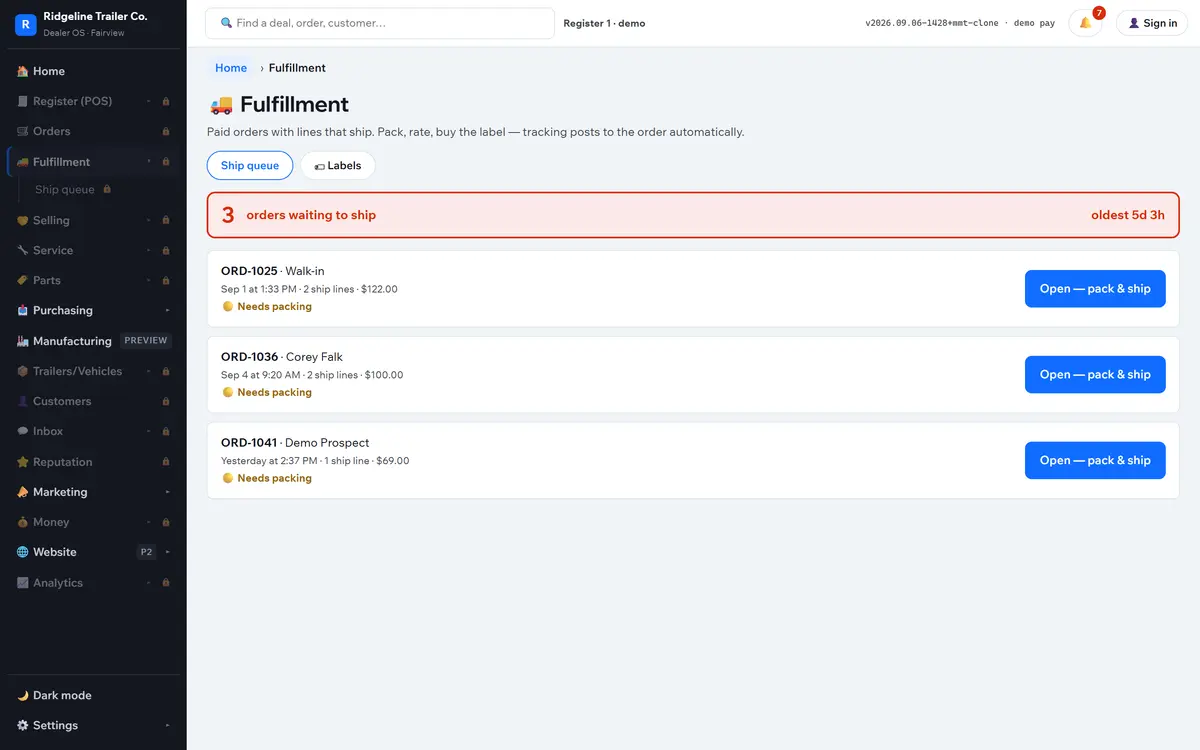
A ship queue that only holds orders with something to ship. Pack into a carton profile, pull live rates, buy the label. Holds and a daily cutoff keep promises honest.
Quotes & big-ticket deals
Every quote carries a public, signed pay link. On a unit that link takes a deposit; on parts it takes the balance. Titling fees attach themselves to a titled trailer.
Customers
Contact, consent flags for text and email, notes, follow-ups, the full message thread, and every ticket and repair order they have ever had.
Catalog
Every product with price, cost, margin, stock and status — plus placement: the menu paths and collections that let a shopper find it. Kits derive their stock from components.
Channels
Merchant Center health destination by destination, plus the live feed URLs for Google, Google local, Google vehicle, Meta and Bing — and an exclusions feed for anything held out of paid Shopping.
Units · serialized inventory
Serialized trailers and vehicles: VIN, stock number, model code, landed cost, days on the lot, title status, photos. Model codes, weight ratings and fee rules live here too.
Titling & paperwork
State title application, manufacturer’s certificate of origin with a controlled form range, the police book, and sequential stock numbers issued at intake.
Purchasing · Forecaster
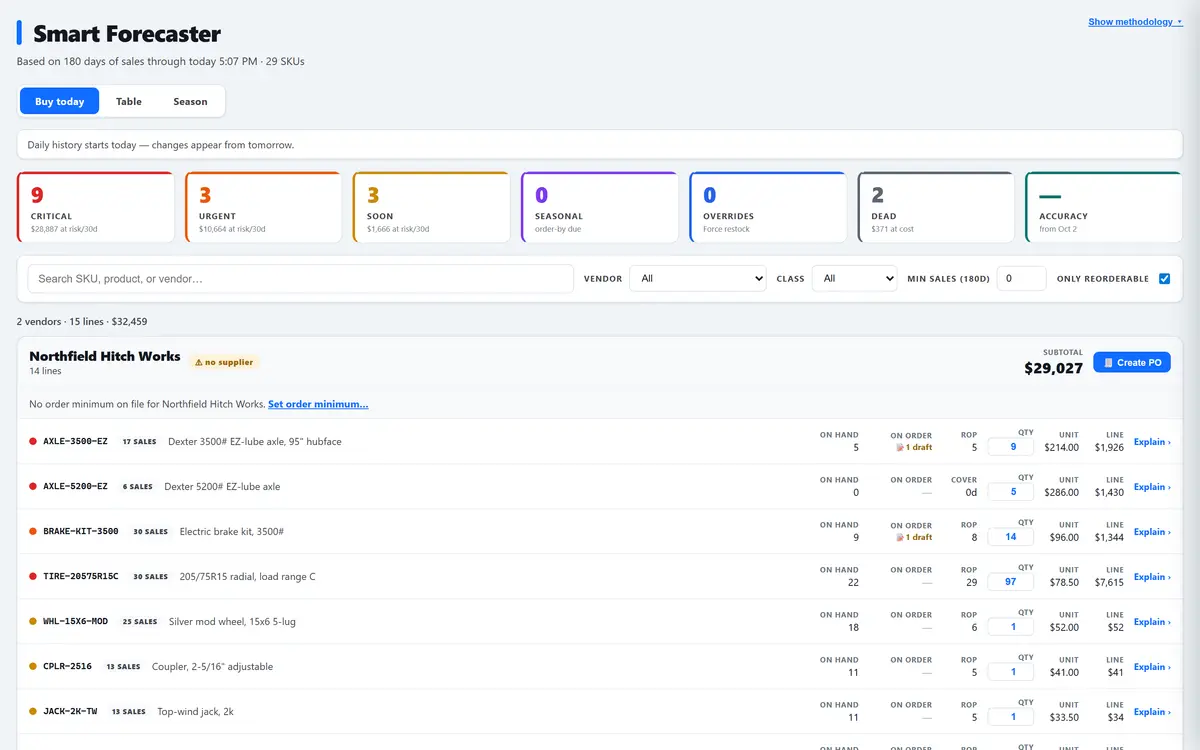
Every part scored on its own sell-through and its own supplier lead time, then sorted into tiers — critical, urgent, buy soon, dead — and grouped by supplier with a Create PO button each.
Purchase orders & receiving
Draft, sent, received. Receiving credits stock, sets the new landed cost and stamps the vendor. Supplier contacts, a vendor scorecard, RMAs and cycle counts sit alongside.
Service desk
Repair orders on a stage board with a scheduler, inspections, warranties and vendor claims behind the same desk. A tech asking for a part becomes a tracked request that turns into a purchase order.
Reputation
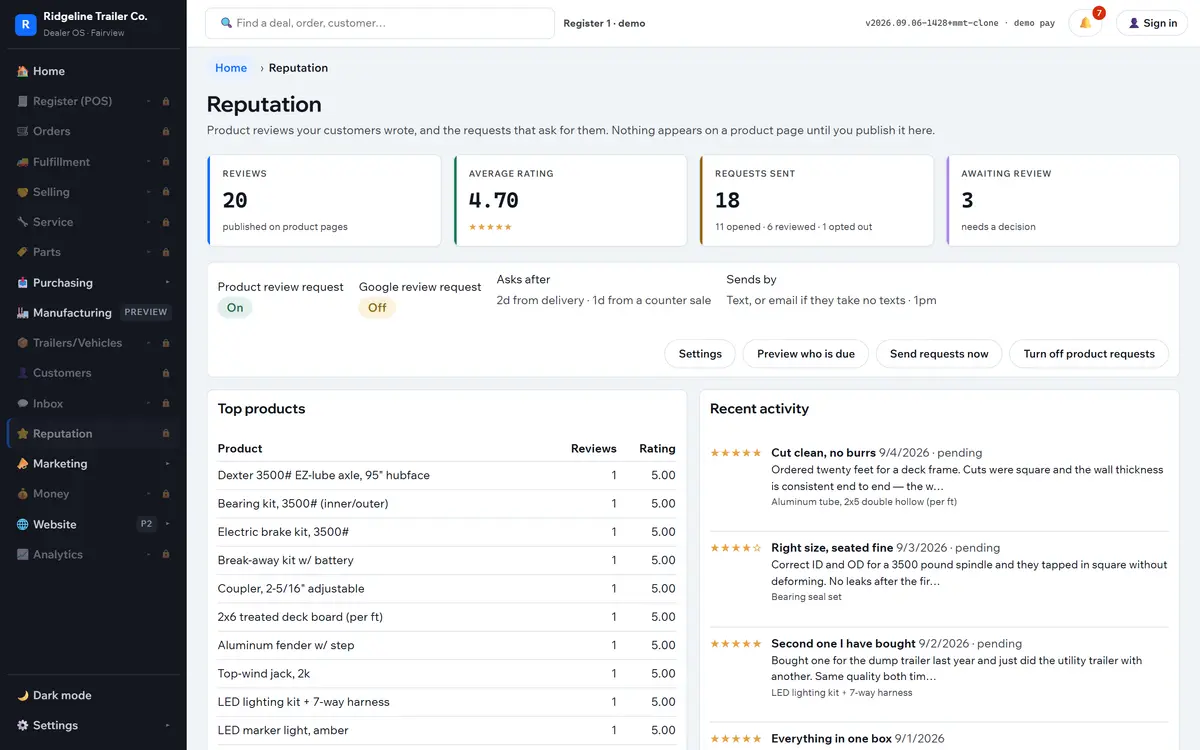
Reviews published on your own product pages, with moderation — approve, reject, or answer as the owner. The ratings and the search value belong to the dealer, not a rented widget.
Marketing desks
A Google desk, a social desk and a combined view. Campaigns, feed health, site analytics and search terms on one screen, with orders attributed back to the campaign that produced them.
Marketplaces
List parts to eBay straight from the catalog, with a fee guard that refuses any category not free to list — deny by default. Facebook Marketplace posts are built from the unit record.
Storefront
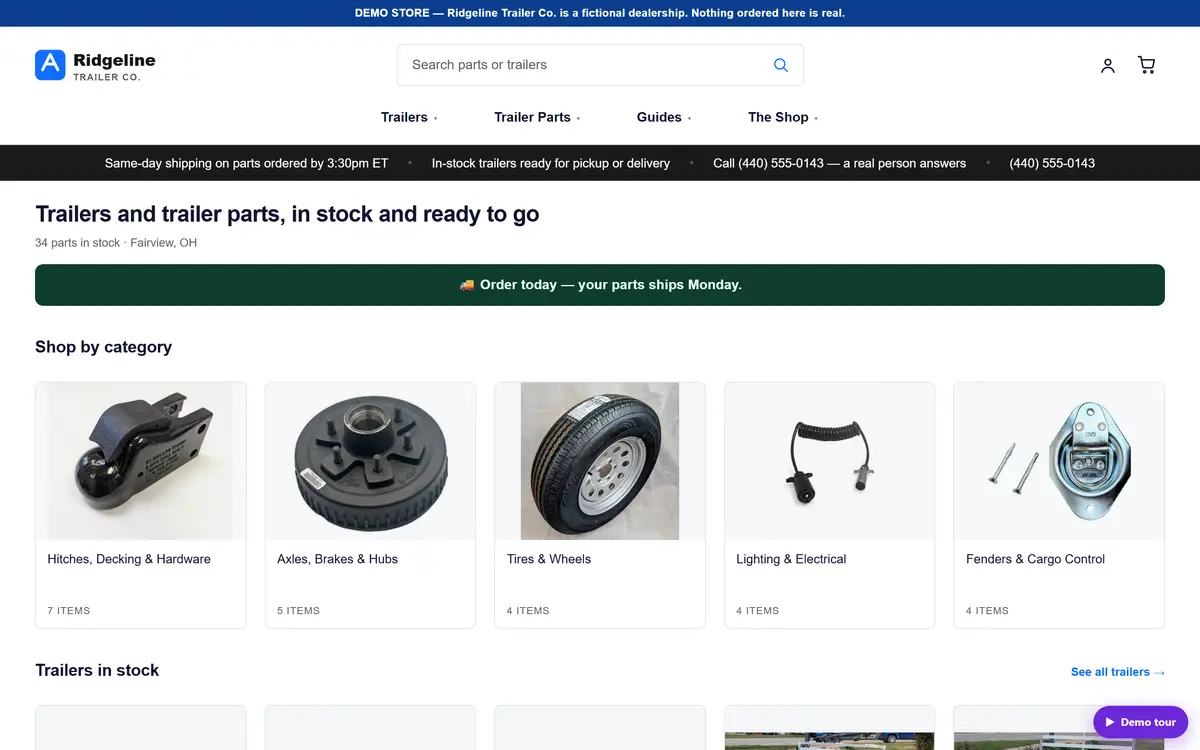
Your own store on your own domain: categories, in-stock trailers, product pages with reviews and a shipping cutoff, plus guides, CMS pages, a sitemap and site search.
Findability & search insights
What shoppers typed into your site search and what happened next — zero results, clicked nothing, found a wall. Titles, menu paths and collections are managed where the product is.
Reports
Revenue trend, mix by department, sales by channel, tender mix, top products, trailer turn and days-to-turn, live web analytics, search insight and cart recovery.
Money & compliance
Receivables aged by bucket, payables, card batches and settlement, sales-tax rules and nexus by state computed live at the cart, and an end-of-day close.
Mobile app & widget
A native Android app installed on the dealership’s phones, the same app on an iPhone home screen, and a widget carrying today’s revenue, margin, sessions and ad spend.
Settings & controls
Staff accounts and role permissions with an audit trail across every capability, print templates, receipt and label hardware, notification rules you edit, backups with a restore drill, and an AI cost meter with a daily cap.
Manufacturing configurator
Pick a platform, a size and options, and price, weight rating and the full build recipe resolve live — hundreds of buildable configurations with no stored variants. Shown as a preview; not part of the shipping product.
On the phone
Take the whole store to the lot
Dealer OS installs on the dealership’s Android phones and tablets as a real app, and sits on an iPhone home screen with the same alerts. It is not a cut-down companion with three screens.
- A widget that answers the question before you ask itToday’s revenue, real gross margin, sessions and ad spend on the home screen. The margin-to-ad-spend ratio is computed from your own ledger — not the number the ad platform reports about itself.
- An alert that lands on the order, not on a home screenNew web orders, payments, missed calls and holds arrive as native push notifications. Tap one and the order opens — the record itself, not a list.
- The whole app works from the lotRegister, orders, inbox, fulfillment and units are all responsive, so a tech can capture unit photos with the phone camera straight into the record.
- Prove the alerts are aliveA push channel that quietly stops is worse than no alerts, because you trust it. The bell panel carries a send-a-test check: press it, feel the phone buzz, know it works today.
One signed session covers the app, the widget and the alerts. There is no second password, no separate mobile account, and no third-party notification app to install and manage.
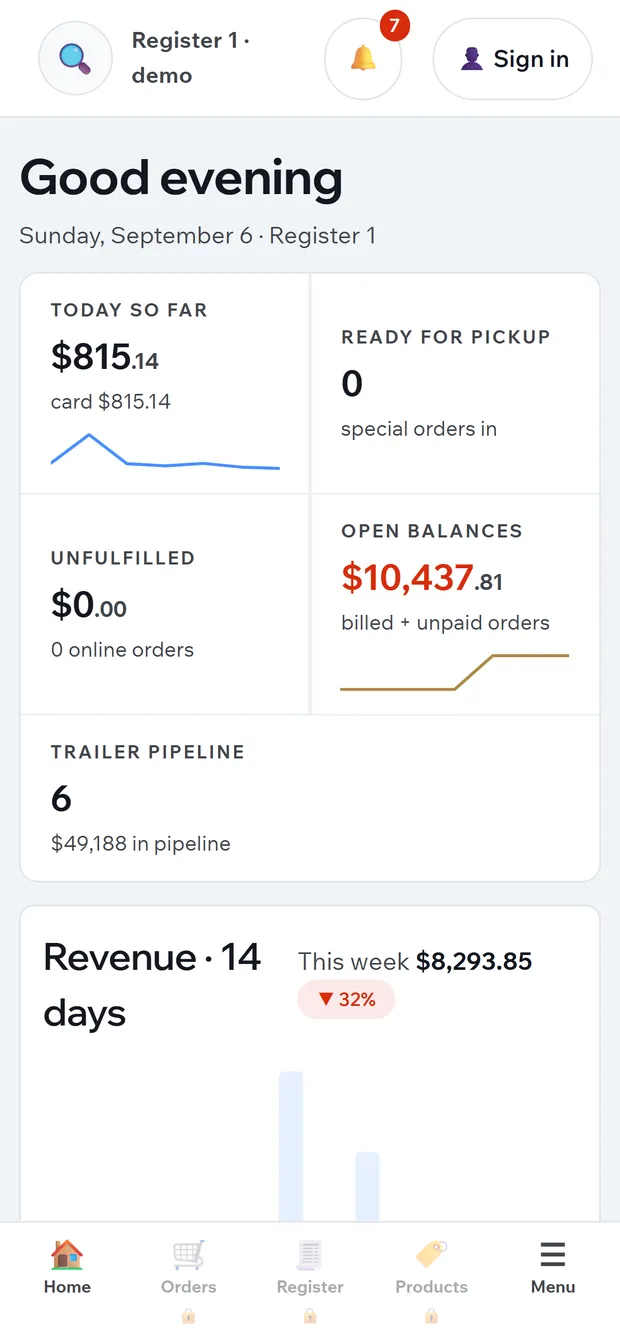
The same system, same session, on the device already in your pocket.
Why this is different
Seven things no bolt-on stack can do
The website is not a plugin
Any store, any catalog: no second product database, no nightly sync, no export and no publish step. “Is it live on the site?” stops being a support ticket and becomes a line in the product editor.
You can actually sell the trailer
Deposit checkout, signed quote pay links, freight by quote, pickup-only rules for oversize goods, VIN binding on payment, titling paperwork out of the record, and automatic retirement from every feed the day it sells.
Every way a customer reaches you
Texts, shop-line calls and web leads land in one thread list against the right customer. A missed call gets a text back within a minute. Replies are drafted from your own store knowledge and wait for a human.
Ad desks that rank by gross profit
Return on ad spend flatters you. These desks rank campaigns by the gross profit they actually brought in, using true paid attribution back to orders, so a high-revenue low-margin campaign cannot hide.
The analysis arrives as an order
The forecaster does not hand you a report to read. It hands you draft purchase orders, grouped by supplier, quantities worked out, the vendor taken from the last receipt for that part.
The dealership fits on the home screen
A native Android app, the same system on an iPhone home screen, a widget with today’s margin read from your ledger, and push alerts that open the record on tap — on the same signed session as the app.
Built on the lot, not in a lab
Skucast is built and run daily at a working Michigan trailer dealership — parts counter, service bay, lot, website and feeds. Every rule in it exists because something went wrong once and had to stop going wrong.
Not only dealers
Works For Any Store That Sells In Person And Online
The dealer features sit on top of a plain retail spine: one product record that already knows how to be a counter line, a web page and a shopping feed. Nothing above is bolted on for a trailer — a bearing kit, a bag of feed and a stove pipe go through exactly the same save.
Local Shopping
Google Local Inventory puts what is on your shelf right now onto Maps and Search, from the same feed that carries the rest of the catalog. There is no spreadsheet to build and no second stock number to keep in step.
Product Pages Built For Search
One record drives the title tag, the meta description, the canonical, the structured data, the image alt text, the sitemap entry, the guide links and the site-search insights. The editor tells you when nothing on the site links to a product.
One Counter And One Website
Register, web orders, fulfillment, returns and reviews all read the same rows. A web sale is not re-keyed at the counter, a counter sale does not leave the website advertising stock you just sold, and a review lands on your own product page.
How it runs
No server to patch. No backup you forgot.
Skucast runs on Cloudflare’s edge network. There is nothing in your building to keep alive, nothing to update on a Sunday, and no box that fails on the busiest Saturday of the year.
Edge, everywhere
Pages and the staff app are served close to whoever opened them. The counter is fast on the shop’s connection and the storefront is fast for a shopper three states away.
Your tenant is yours
Multi-tenant by design and isolated per dealer: separate data, separate keys, separate storefront and separate feeds. Nothing in the platform is written against one dealer’s name.
Backups that prove themselves
A nightly backup with an offsite copy, and a restore drill that reports a pass or a failure with the row count. A backup nobody has ever restored is not a backup.
Attributable by person
Staff roles gate every money-touching capability, with an audit trail behind them. If the answer to “who voided that” is a shrug, you do not have a system.
Already on Shopify?
Keep your store. Take the back office.
Not every shop is ready to move its whole platform. Skucast for Shopify is the separate add-on: demand forecasting, self-driving purchase orders, vendor scorecards, RMAs and daily action reports, installed on the store you already run.
Two products, one company
- Dealer OSThe whole dealership. Storefront on your own domain, units and titling included.
- Skucast for ShopifyAn add-on app. Forecasting and purchase orders only — your storefront stays on Shopify.
Book a walkthrough
Come look at a dealership that already runs this way
A furnished demo dealer is standing by — catalog, lot, orders, service, inbox, feeds and reports all populated. Ask for access and we send your own login, the guided tour and the storefront link. Then we walk your own inventory through it.
Simple monthly plans — contact us for details. Setup includes catalog and unit import, your storefront, and your feeds registered with each channel.